Rechercher dans ce blog

Monday, December 4, 2023

Krafton Elevates BGMI Experience with Ranveer Singh's Playable Avatars and Exclusive Events - Startup Story

Gaming

 In a strategic move to enhance the local flavor of Battlegrounds Mobile India (BGMI), Krafton, the South Korean gaming giant, has integrated Bollywood superstar Ranveer Singh as a playable character in the popular battle royale title. This move is part of Krafton’s ongoing efforts to deepen its roots in the Indian gaming community and attract a wider audience.

Ranveer Singh, who was appointed as the brand ambassador for Krafton in September 2023, now graces the game as two distinct 3D avatars – RS Dark Stealth and RS Swaggy Baba. The latest game update not only introduces these playable characters but also includes emotes inspired by the actor’s iconic dance moves. Players can now express themselves through emotes such as Swagster Groove, Swagster Tathad, Swagster Sway, Swagster Twirl, and enjoy a special voice pack, among other items.

The company has unveiled a Ranveer Singh Discovery event, active from December 1, 2023, to January 25, 2024. This event introduces a point-based system where players can earn points by participating in Classic mode matches. With 50 stages, the event offers a range of rewards, including ornaments, space gifts, parachutes, and the opportunity for players to accumulate up to 5,000 points.

To further engage players, Krafton has introduced a “Play pure with Ranveer Singh” event, encouraging gamers to complete various tasks and collect RS tokens. These tokens can be exchanged for permanent rewards in the form of in-game digital goods. Tasks include playing as Ranveer Singh, participating in Pure Showdown, teaming up in the game, showcasing Pure Speed, and daily logins.

Krafton India CEO Sean Hyunil Sohn expressed the company’s commitment to localizing content for the Indian audience. He stated, “The introduction of Ranveer Singh’s essence in the game with this extensive collaboration represents our commitment to localizing content for the Indian audience and creating moments that resonate culturally with our diverse player base.”

This move follows Krafton’s introduction of an Indian faction in its mobile strategy game, ‘Road To Valor: Empires,’ earlier this year. The faction features characters inspired by ancient Indian tales and legends. In August, Krafton pledged a $150 million investment in Indian gaming and interactive entertainment startups over the next two to three years, bringing its total commitment to the Indian market to about $290 million. Additionally, the company announced the Krafton India Gaming Incubator in October 2023, aimed at supporting game development startups in the country with financial assistance and mentorship from local and global Krafton executives and industry experts.

Follow Startup Story

Adblock test (Why?)


Krafton Elevates BGMI Experience with Ranveer Singh's Playable Avatars and Exclusive Events - Startup Story
Read More

Samsung Galaxy A55 Alleged Renders Show Triple Rear Cameras, Hole-Punch Display - Gadgets 360

Samsung Galaxy A55 could be inching towards its launch as its specifications and renders have surfaced online. The upcoming Galaxy A-series smartphone is said to come with a 6.5-inch flat display. The renders suggest that the Galaxy A55 will have a hole punch cutout on the display. It is seen carrying triple rear cameras as well. The handset is expected to be powered by an Exynos 1480 SoC. The Galaxy A55 will debut as a successor to the Galaxy A54 5G, which was launched in India in March this year.

Tipster Steve H.McFly (@OnLeaks) in collaboration with MySmartPrice shared the alleged renders and specifications of the Samsung Galaxy A55. The renders show the display with a centrally located hole punch cutout housing the selfie camera. The smartphone is seen in a black shade with a triple camera setup at the rear. The phone doesn't seem to have a camera island as sensors are arranged in small individual circular modules. The camera sensors are placed vertically with a small LED flash unit beside them. Further, the power button and the volume rockers are seen arranged on a protruding part of the right edge.

galaxy a55 samsung mysmartprice Samsung Galaxy A55

Samsung Galaxy A55
Photo Credit: MySmartPrice/ @OnLeaks

As per the leak, the Galaxy A55 will have a 6.5-inch flat display with full HD+ resolution and up to 120Hz screen refresh rate. It is said to measure around 161.1 x 77.3/77.9 x 8.2mm.

Past reports claimed that the Galaxy A55 will debut in March next year. It is said to be powered by an Exynos 1480 SoC coupled with Xclipse 530 GPU. It is expected to pack a 50-megapixel primary rear camera sensor. It is likely to include a 32-megapixel selfie camera.

The Galaxy A55 is expected to debut as a follow-up to the Galaxy A54 5G. The latter is currently available for purchase with a starting price tag of Rs. 38,999 for the 8GB RAM + 128GB storage variant. It is offered in Awesome Lime, Awesome Graphite, Awesome Violet, and Awesome White colour options.


Affiliate links may be automatically generated - see our ethics statement for details.

Adblock test (Why?)


Samsung Galaxy A55 Alleged Renders Show Triple Rear Cameras, Hole-Punch Display - Gadgets 360
Read More

WhatsApp to allow sharing status updates on Instagram. Check how the new feature works | Mint - Mint

Social media giant Meta seems to be tightly integrating its social media platforms - Instagram and WhatsApp. According to a recent report by WABetaInfo, WhatsApp will soon allow its users to share their status updates directly as Stories on Instagram, theoretically saving users a lot of time. WhatsApp already allows users to share their status updates directly with Facebook, and integration with Instagram seems like the next logical step.

According to the WABetaInfo report, while citing the latest WhatsApp beta for Android 2.23.25.20 update, noted that the social media company is working to improve its status sharing feature and make it compatible with Instagram. The report notes that the feature, which is expected to be released at a later date, will be optional and will leave the final decision on whether or not to share an update to Instagram in the hands of the user.

The report also notes that sharing updates directly from WhatsApp has numerous benefits, including saving time and improving the process of sharing updates across platforms. However, given that WhatsApp lags far behind Instagram in terms of photo or video editing features, Instagram fanatics may also feel that something is missing from their Stories added directly from WhatsApp.

WhatsApp's AI chat feature:

Recently, WhatsApp also announced a new AI chats feature which allows users to interact with an AI chatbot. Reportedly, there is now a button situated above the icon for initiating new chats in the Chats tab. This button facilitates the swift opening of AI-powered chats, enhancing the speed and convenience for users.

The AI chatbot, driven by Meta AI, was initially unveiled by Mark Zuckerberg, CEO of Meta, WhatsApp's parent company, in September. He disclosed that the company is testing AI-powered chatbots for a specific segment within the USA.

In the September beta release of WhatsApp, the AI chatbot was introduced, but it was concealed within the contact list, creating difficulty in locating and initiating conversations. To streamline the process and enhance user experience, the WhatsApp beta for Android version 2.23.24.26 now incorporates a small button on the home screen for quick access to the chatbot.


Milestone Alert!
Livemint tops charts as the fastest growing news website in the world 🌏 Click here to know more.

Related Premium Stories

Catch all the Elections News, Technology News and Updates on Live Mint. Download The Mint News App to get Daily Market Updates & Live Business News.
More Less

Updated: 04 Dec 2023, 01:26 PM IST

Adblock test (Why?)


WhatsApp to allow sharing status updates on Instagram. Check how the new feature works | Mint - Mint
Read More

Saturday, December 2, 2023

Garena Free Fire Redeem codes for December 2: Chance to win rare costumes and weapons - HT Tech

Garena Free Fire Redeem codes for December 2: Free Fire can be the perfect game to play when a group of friends meet up and do not have an idea what to do or where to go. The squad mode in the game is interactive and has enough elements of strategy to keep the group engaged while they're having fun. And because the game exists entirely inside your smartphone, you can play it on the go, no matter where you are. But playing with friends also means you have to show off a little. While getting that triple kill using a sniper can be tough to achieve, wearing a cool outfit never goes out of style. Claim these redeem codes to get exciting in-game rewards.

Garena Free Fire Redeem codes for December 2

These redeem codes are 12-digit unique alphanumeric codes that are shared by the developers as a token of appreciation towards the gaming community. These codes contain various in-game items ranging from skins, weapons, loot crates, gloo walls, diamond vouchers, costumes, premium bundles and more. Each code contains a mystery reward that you only find out after you have redeemed it.

There are some conditions that follows as well. First, these codes come with an expiration limit of 12-18 hours and will not work after that. So, make sure to claim them as early as possible. Further, a single code cannot be claimed twice by the same player but there is no limit to how many codes a player can redeem. Finally, some codes may not work for you due to them being region-restricted, so redeem more number of codes to ensure you get all the exciting rewards.

Today's redeem codes:

  • FFYUFJU78SU7YTG
  • FBRNHMKIUYSTGF2
  • F3BG4N5MTKYLHOI
  • FBVYHDNEK46O5IT
  • FUGYHVBCXMSOUE4
  • FU5YHGBTNYG9MBK
  • FLOVI8C7DYETG4B
  • FN6MY7LJPNO9BIU
  • FV7YFHDN4M56LYP
  • FU0HLKBVCPYO987
  • FSY6TGF3BNRMFCI
  • FU7Y6T5SRFRWVB4
  • FKLIYER5HYKU8KH
  • FKY89OKED5RTGH
  • FIKYL9OKIRYTHTR6
  • FYILTYII76HFHDRR
  • FI89LMNGUTF45G

Garena Free Fire Redeem codes for December 2: How to redeem FF codes to get free rewards

Step 1: Visit the official website of Garena Free Fire redemption page at https://reward.ff.garena.com/en

Step 2: Then log in using your Facebook, Google, Twitter, or VK account details.

Step 3: Next, copy and paste to redeem codes into the text box and click on the confirm button to continue.

Step 4: After the confirmation, a dialogue box will show up for cross-check. Tap on 'OK'.

Step 5: The codes will be redeemed successfully and you can collect the rewards in the in-game mail section.

Adblock test (Why?)


Garena Free Fire Redeem codes for December 2: Chance to win rare costumes and weapons - HT Tech
Read More

GTA 6 Map Leaks: Biggest map changes in GTA 6 expected by the community - Sportskeeda

Several GTA 6 map leaks have emerged online in the last few years. The most prominent one among these is still the development footage leak from September 2022, which heavily suggested the next Grand Theft Auto title will be set in Vice City.

This location is Rockstar Games' iteration of Miami and, despite having appeared last in 2006, remains incredibly popular among fans of the series.

Interestingly, the sequel's leaked footage also hinted at the inclusion of other areas likely inspired by different parts of Florida. The title's debut trailer, releasing next week, should confirm the setting, but the community is also expecting changes in terms of what one can do in the Grand Theft Auto 6 map.


Analyzing the biggest GTA 6 map changes expected by the community based on leaks

youtube-cover

Branding such as Vice City Mambas, Vice City Metro Mule, ViceYCity Hotel, and more seen in the GTA 6 leaks are some of the biggest indicators of the next Grand Theft Auto installment possibly being set in Vice City. Reputed video game journalist Jason Schreier has also suggested the title being set in a Miami-inspired location.

However, even if the game takes place in Vice City, the community expects the map to be much bigger and look quite different from its previous two appearances in 2002 and 2006. This is because the returning locations featured in Grand Theft Auto's HD Universe (which kicked-off with Grand Theft Auto IV), Liberty City, and Los Santos, are significantly larger and very different from their original iterations.

In addition to Vice City, the GTA 6 leaked footage also suggested the inclusion of areas named Port Gellhorn and Rockridge. While the former is reportedly based on Panama City, the latter is possibly inspired by Little Havana, a district featured in Grand Theft Auto: Vice City.

Moreover, Port Gellhorn might be a larger area in comparison to something like Paleto Bay from Grand Theft Auto 5, as its own police department was seemingly spotted in the leaks. If true, it would be a significant change as secondary areas usually don't offer much to the gameplay.

More information is expected to be out once the GTA 6 trailer is released.


youtube-cover

Another big change the gaming community expects in the GTA 6 map is the inclusion of numerous enterable buildings. This has been one of the biggest complaints regarding Grand Theft Auto 5. While Los Santos and Blaine County make up for a sizeable map, there isn't much to do in it after the story mode.

Interestingly, some of the debug code seen in the Grand Theft Auto 6 leaks hint at the next game possibly featuring 157 interiors. Having many enterable buildings would help in providing an immersive experience. Confirmation for the same is yet to arrive but we expect Rockstar to reveal such details moving forward.

Poll : Do you think GTA 6's map will be the biggest in the series yet?

0 votes

More from Sportskeeda

Edited by Anirudh Padmanabhan

Adblock test (Why?)


GTA 6 Map Leaks: Biggest map changes in GTA 6 expected by the community - Sportskeeda
Read More

Friday, December 1, 2023

Amazon’s Alexa app gets a big redesign with a focus on smart home control - The Verge

Screenshots of the Alexa app.
The Amazon Alexa mobile app has a new design and new features.
Image: Amazon

It’s been 87 years ... (okay, three), but Amazon has finally updated its Alexa app. The revamp is rolling out fully this week to iOS and Android devices, but it started this summer with some small changes you may have already spotted. The end result is an app that’s more streamlined and more tailored to smart home control. And while it’s not appreciably faster (boo), it is considerably more intuitive and easier to use (yay).

I’ve not been quiet about my disdain for the Alexa app’s (lack of) capabilities. But this new app and the new Map View feature that launched last month, combined with the increased smart home control capabilities of the Echo Show 8 and the new Echo Hub, could convince me to try it again as my smart home daily driver.

According to Amazon’s director of smart home, Charlie French, the redesign’s primary focus is putting smart home controls front and center. “We’ve seen great momentum with smart home. We now have millions of customers with over 20 devices connected. So, this is about making it as easy as possible to access their devices,” he said in an interview with The Verge.

The new app is less cluttered and has fewer cutesy Amazon illustrations. It now looks less like an attempt at being a personal assistant and more like a dedicated smart home app.

Here’s a rundown of the biggest changes:

The new Alexa app Home tab

The Alexa app redesign from 2020 (left) and the newly redesigned Alexa app (right).
Image: Amazon and Image: Amazon

The Home tab now has clear organization, as opposed to the random “most relevant” and “recently used” items it showed previously. It’s also customizable, so you can pick what you want to see and use, not what Alexa thinks you want to see.

There are now three distinct sections for smart home / Alexa control, all of which you can edit.

New shortcut buttons

The top row of the Home tab is now a sideways scrollable list of shortcut buttons for smart home devices and Alexa tools like Music, Shopping Lists, and Drop In. You can edit this and choose from around 17 different shortcuts.

Shortcuts for device types like lights, locks, and climate take you to a list of the devices you have in that category, where you can control them. The shortcut also shows a device’s status, such as how many lights are on and the current temp. French says this info is currently limited to users with less than 20 devices but will be coming soon to “the power users.”

The Activity tab comes next; French says this shows time-sensitive cards for info like smart home alerts, timers, alarms, and any reminders you have set. You can expand this section, but it takes up less space by default than the previous activity section. Plus, you can dismiss the cards, and the whole section goes away completely when it’s empty.

More Favorites

Favorites has moved from the Devices tab and is now front and center on the Home tab, letting you instantly control devices like lights and locks with one tap as soon as you open the app.

Tapping devices like thermostats and cameras pulls up a bottom sheet so you can adjust the thermostat's temperature or see a live view without hopping into another screen.

According to French, you can have up to 200 devices in your Favorites. However, I added 14, and it started to get a bit unwieldy. Coming in 2024, Favorites will be able to include snapshots from up to six Ring cameras, with a Ring Protect Plan, says French.

Below Favorites is a row of ads for Amazon services and products. Yes, there are still ads. (This is Amazon, after all.) But they seem smaller and less intrusive than previous iterations.

The bottom menu bar in the app has been streamlined to just three icons: Home, Devices, and More. More is where you’ll find Settings, Activity History, and all the other stuff the Alexa app offers (Routines, music, skills, automotive, emergency assist, etc.).

Finally, the Home tab Alexa bubble (which overlays on most screens) now lets you type a text command to the assistant as well as talk to it.

The new Amazon Alexa Devices screen

The other big revamp is the Devices screen. Now that the Home tab is more focused on smart home controls, Devices has become more of a settings page, “It’s somewhere you go to do more involved things,” says French, as opposed to using it for quick control.

Groups — Alexa’s version of rooms — are now in a sideways scrolling line at the top, and a list view of your connected devices takes up the rest of the screen. This might be a bit of an adjustment for those used to using Groups to control their homes.

You can now search your devices list by name and sort them alphabetically, by date added, or by device type — including “other.” That last one is a big upgrade for me personally. Previously, looking for a device that wasn’t part of the main categories (such as motion sensors) meant scrolling through all devices — which, for me, is upward of 200. Now, the “other” filter cuts down on clutter.

Alexa now has a map view

The alternative to the list view on the Devices screen is the new Map View feature. This ostensibly replaces the Groups function in the app for controlling your home. You can access this by tapping the map icon in the top right. From here, you can interact directly with devices on a floor plan of your home.

However, Map View is in a closed preview right now and is only available on iOS devices. It also requires an iPhone 12 Pro or Max iPhone or newer or a fourth-gen iPad Pro or newer to set up. It will be coming to the Echo Hub when it launches. I’ve been testing the interface for a week or so now and will have a review of it shortly.

I’ve only just started playing with the new app, and as noted, I’m still running into some lag and occasional glitches. But overall, the improvements feel like quality upgrades. It is high time Amazon focused on improving Alexa as a smart home assistant, where it has the most potential to be useful.

Screenshots by Jennifer Pattison Tuohy / The Verge

Adblock test (Why?)


Amazon’s Alexa app gets a big redesign with a focus on smart home control - The Verge
Read More

YouTube Music Recap 2023: How to access stats, new features and more - Times of India

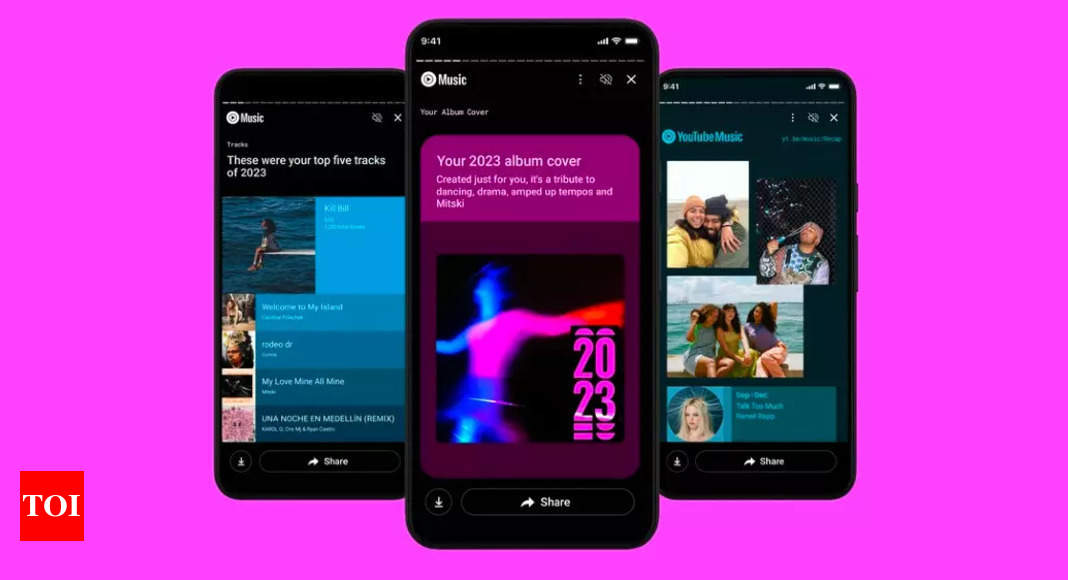
After Apple Music Replay and Spotify Wrapped, YouTube Music is now rolling out 2023 Recap for its users, offering a glimpse into their listeninging habits. Just like yesteryears, the app offers personalised stats, including top artists, songs, moods, genres, albums, playlists and more.
Unlike Spotify’s catchyWrapped, YouTube Music’s recap is more of an informative yearly roundup and the company has also announced three features: custom album art, music moods and the ability to pair Google Photos memories with songs.
How to access YouTube Music 2023 Recap
  • Open your Recap in YouTube Music.
  • Go to the YouTube Music app on your mobile device.
  • Make sure you’re signed in.
  • Select your profile photo and then ‘Your Recap’.
YouTube Music shows users’ top five artists, songs, moods, genres, albums and playlists, longest listening streak as well as how many total minutes users have listened to in 2023.
The Recap page will be among the playlists, along with top stats in stories. To view stories, select Watch now and users can also download, or share the stories.
YouTube also announced that it is also bridging this feature to the YouTube app, where users will see a dedicated Recap page featuring the same stats and insights available on YouTube Music.
YouTube Music features
Custom album art: YouTube Music will now create a customised artwork by pulling a collection of colours, vibes and visuals from top track, energy score and top moods from this year, and to blend it to create the album art. “If you were an album, this would be the cover,” YouTube said.
Matching mood with music: The second feature is mood matching wherein YouTube Music will classify the top songs with terms that suggest mood, like fun, chill and love, among others.
Pairing Google Photos with top songs: Last year, YouTube Music introduced shareable cards highlighting top songs from each season which users could personalise by adding images directly from Google Photos. Now, with 2023 Recap, users can now shuffle and customise the photos to create a unique visual.

Adblock test (Why?)


YouTube Music Recap 2023: How to access stats, new features and more - Times of India
Read More

Nothing announces its OnePlus Nord rival ‘Phone 2a’, says it is better than Phone 1 - The Financial Express

Nothing made a bunch of announcements today. Stand-out among them was the official name drop of its next smartphone. The phone will be call...